
Honda CR-V: Driving
Honda CR-V 2017-2026 Owner's Manual / Driving
- Before Driving
- Towing a Trailer
- Off-Highway Driving Guidelines
- When Driving
- Starting the Engine
- Precautions While Driving
- Continuously Variable Transmission
- Shifting
- Auto Idle Stop
- ECON Button
- Front Sensor Camera
- Adaptive Cruise Control (ACC) with Low Speed Follow
- To Set the Vehicle Speed
- Road Departure Mitigation (RDM) System
- Lane Keeping Assist System (LKAS)
- Vehicle Stability Assist™ (VSA®), aka Electronic Stability Control (ESC), System
- Agile Handling Assist
- Blind spot information System*
- LaneWatch™*
- Real Time AWD with Intelligent Control System™*
- Tire Pressure Monitoring System (TPMS)
- Tire Pressure Monitoring System (TPMS) - Required Federal Explanation (U.S. models)
- Braking
- Brake System
- Anti-lock Brake System (ABS)
- Brake Assist System
- Collision Mitigation Braking System™ (CMBS™ )
- Parking Your Vehicle
- Multi-View Rear Camera
- Refueling
- Fuel Economy and CO2 Emissions
- Turbo Engine Vehicle
 Compass Zone Selection
Turn the ignition switch to ON
.
Press and hold the (day/night)
button
until the display shows the compass setting
menu.
Rotate to select Zone,
then press ...

Other information:
Honda CR-V 2017-2026 Owner's Manual: iPod/USB Flash Drive
I..
Honda CR-V 2017-2026 Owner's Manual: To cancel
To cancel the LKAS: Press the MAIN or LKAS button. The LKAS is turned off every time you stop the engine, even if you turned it on the last time you drove the vehicle. Pressing the MAIN button also turns ACC with Low Speed Follow on and off. The system operation is suspended if you: Set the wipers to continuous operation...
Categories
- Manuals Home
- Honda CR-V Owners Manual
- Honda CR-V Service Manual
- Odometer and Trip Meter
- Multi-View Rear Camera
- Auto Idle Stop System ON/OFF
- New on site
- Most important about car
Driver Attention Monitor
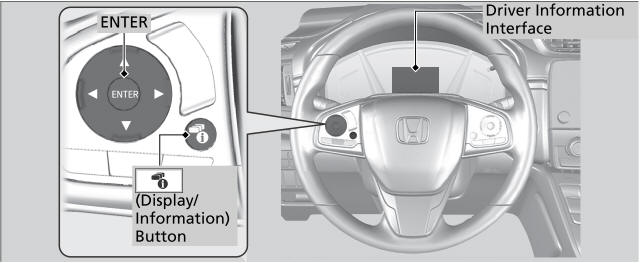
The Driver Attention Monitor analyzes steering inputs to determine if the vehicle is being driven in a manner consistent with drowsy or inattentive driving. If it determines that the vehicle is being driven in such a manner, it will display the degree of the driver's attention in the Driver Information Interface.

Copyright © 2026 www.hocrv.com