
Honda CR-V: When Driving / Starting the Engine
- Models without smart entry system
- Models with smart entry system
- Remote Engine Start with Vehicle Feedback*
- Starting to Drive
 When Driving
..
 Models without smart entry system
Make sure the parking brake is applied.
The parking brake and brake system
indicator comes on for 15 seconds when
you pull up the electric parking brake
switch...
Other information:
Honda CR-V 2017-2026 Owner's Manual: Housing Locations
The front airbags are housed in the center of the steering wheel for the driver, and in the dashboard for the front passenger. Both airbags are marked SRS AIRBAG. During a frontal crash severe enough to cause one or both front airbags to deploy, the airbags can inflate at different rates, depending on the severity of the crash, whether or not the seat belts are latched, and/ or other factors...
Honda CR-V 2017-2026 Owner's Manual: Opening/Closing Windows and the Moonroof* or Panoramic Roof *1 with the Key
To open: Unlock the driver’s door with the key. Within 10 seconds of returning the key to the central position, turn the key in the unlock direction and hold it there. To close: Lock the driver’s door with the key. Within 10 seconds of returning the key to the central position, turn the key in the lock direction and hold it there...
Categories
- Manuals Home
- Honda CR-V Owners Manual
- Honda CR-V Service Manual
- How to Use the Auto High-Beam
- Compass Zone Selection
- Accessory Power Sockets
- New on site
- Most important about car
Advanced Airbags
The airbags have advanced features to help reduce the likelihood of airbag related injuries to smaller occupants.
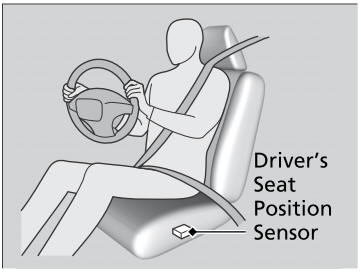
The driver's advanced airbag system includes a seat position sensor.

Copyright © 2026 www.hocrv.com