
Honda CR-V: Towing a Trailer / Towing Preparation

 Towing Load Limits
Your vehicle can tow a trailer if you carefully observe the load limits, use
the proper
equipment, and follow the towing guidelines. Check the load limits before
driving...
Other information:
Honda CR-V 2017-2026 Owner's Manual: Key Types and Functions
All the keys have an immobilizer system. The immobilizer system helps protect against vehicle theft. The keys contain precision electronics. Adhere to the following advice to prevent damage to the electronics: Do not leave the keys in direct sunlight, or in locations with high temperature or high humidity...
Honda CR-V 2017-2026 Owner's Manual: Vehicle Information and Message from Honda Tips
Using the shortcut operation, you can quickly gain access to new messages. In the header area, a message appears to notify you of a new message. When the message is received, a notification ring can be heard. The notification message is replaced by an icon which remains displayed until the new message is read...
Categories
- Manuals Home
- Honda CR-V Owners Manual
- Honda CR-V Service Manual
- Jump Starting Procedure
- Accessory Power Sockets
- How to Turn Off the Auto High-Beam
- New on site
- Most important about car
Your Vehicle's Safety Features
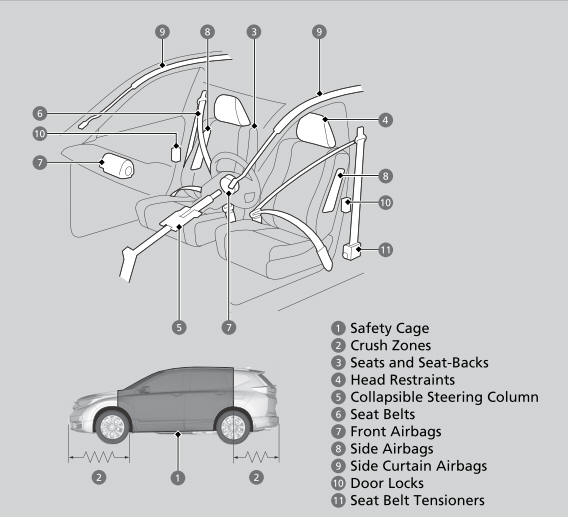
The following checklist will help you take an active role in protecting yourself and your passengers.
Your vehicle is equipped with many features that work together to help protect you and your passengers during a crash.

Copyright © 2026 www.hocrv.com