
Honda CR-V: Safe Driving / Seat Belts
Honda CR-V 2017-2026 Owner's Manual / Safe Driving / Seat Belts
 Safety Checklist
For the safety of you and your passengers, make a habit of checking these
items
each time before you drive.
After everyone has entered the vehicle, be sure all doors and the
tailgate are
closed and locked...
 About Your Seat Belts
Seat belts are the single most effective safety device because they keep you
connected to the vehicle so that you can take advantage of many built-in safety
features...
Other information:
Honda CR-V 2017-2026 Owner's Manual: Turn Signals
The turn signals can be used when the ignition switch is in ON *1 . *1: Models with the smart entry system have an ENGINE START/STOP button instead of an ignition switch. One-touch turn signal When you lightly push up or down and release the turn signal lever, the exterior turn signals and turn signal indicator blink three times...
Honda CR-V 2017-2026 Owner's Manual: If the Low Tire Pressure/TPMS Indicator Comes On or Blinks
Reasons for the indicator to come on or blink A tire pressure is significantly low, or the TPMS has not been calibrated. If there is a problem with the TPMS or the compact spare tire is installed, the indicator blinks for about one minute, and then stays on...
Categories
- Manuals Home
- Honda CR-V Owners Manual
- Honda CR-V Service Manual
- Auto Idle Stop System ON/OFF
- To rapidly defrost the windows
- How to Turn Off the Auto High-Beam
- New on site
- Most important about car
Your Vehicle's Safety Features
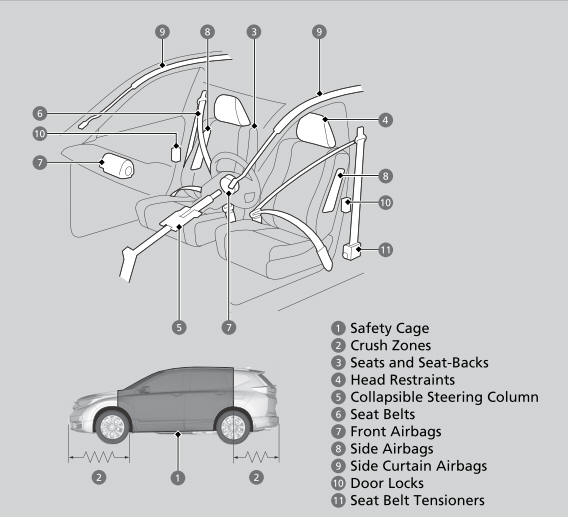
The following checklist will help you take an active role in protecting yourself and your passengers.
Your vehicle is equipped with many features that work together to help protect you and your passengers during a crash.

Copyright © 2026 www.hocrv.com