
Honda CR-V: Safe Driving
Honda CR-V 2017-2026 Owner's Manual / Safe Driving
- For Safe Driving
- Important Safety Precautions
- Important Handling Information
- Your Vehicle's Safety Features
- Safety Checklist
- Seat Belts
- Airbags
- Airbag System Components
- Types of Airbags
- Front Airbags (SRS)
- Side Airbags
- Side Curtain Airbags
- Airbag System Indicators
- Airbag Care
- Child Safety
- Exhaust Gas Hazard
- Safety Labels
 Quick Reference Guide
Auto Idle Stop Function
To improve fuel economy, the engine stops and then restarts as detailed below.
When Auto Idle Stop is on, the Auto Idle Stop indicator (green) comes on...
 For Safe Driving
The following pages explain your vehicle's safety features and how to use
them
properly. The safety precautions below are ones that we consider to be among the
most important...
Other information:
Honda CR-V 2017-2026 Owner's Manual: Odometer and Trip Meter
Odometer Shows the total number of miles (U.S.) or kilometers (Canada) that your vehicle has accumulated. Trip Meter Shows the total number of miles (U.S.) or kilometers (Canada) driven since the last reset. Meters A and B can be used to measure two separate trips...
Honda CR-V 2017-2026 Owner's Manual: Anti-lock Brake System (ABS)
Helps prevent the wheels from locking up, and helps you retain steering control by pumping the brakes rapidly, much faster than you. The electronic brake distribution (EBD) system, which is part of the ABS, also balances the front-to-rear braking distribution according to vehicle loading...
Categories
- Manuals Home
- Honda CR-V Owners Manual
- Honda CR-V Service Manual
- Rear Seats
- How to Turn Off the Auto High-Beam
- TPMS Calibration
- New on site
- Most important about car
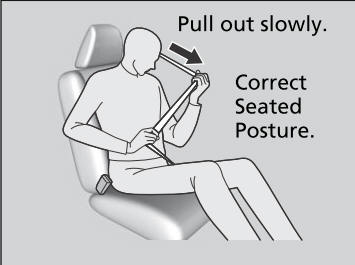
Fastening a Seat Belt
After adjusting a front seat to the proper position, and while sitting upright and well back in the seat:
Pull the seat belt out slowly.

Copyright © 2026 www.hocrv.com