Honda CR-V: Handling the Unexpected / Refueling
If you have run out of fuel and need to refuel your vehicle from a portable fuel container, use the funnel provided with your vehicle.
- Turn off the engine.
- Press on the edge of the fuel fill door to
make it pop up slightly.
- The fuel fill door opens.

- Take the funnel out of the tool case in the cargo area.
- Place the end of the funnel on the lower
part of filler opening, then insert it slowly
and fully.
- Make sure that the end of the funnel goes down along with the filler pipe.
- Fill the tank with fuel from the portable fuel
container.
- Pour fuel carefully so you do not spill any.
- Remove the funnel from the filler neck.
- Wipe up any fuel from the funnel before storing it.
- Shut the fuel fill door by hand.

WARNING
Gasoline is highly flammable and explosive. You can be burned or seriously injured when handling fuel.
- Stop the engine, and keep heat, sparks, and flame away.
- Handle fuel only outdoors.
- Wipe up spills immediately.
NOTICE
Do not insert the nozzle of a portable fuel container or any funnel other than the one provided with your vehicle. Doing so can damage the fuel system. Do not try to pry open or push open the sealed fuel tank with foreign objects. This can damage the fuel system and its seal.
Make sure the fuel in the portable fuel container is gasoline before you refuel.
 When You Cannot Open the Tailgate
If you cannot open the tailgate, use the following procedure:
Use a flat-tip screwdriver and remove the
cover on the inside of the tailgate.
Wrap the flat-tip screwdriver with a cloth
to prevent scratches...
 Information
..
Other information:
Honda CR-V 2017-2026 Owner's Manual: Wallpaper Setup
You can change, store, and delete the wallpaper on the audio/information screen. Import wallpaper You can import up to three images, one at a time, for wallpaper from a USB flash drive. Connect the USB flash drive to the USB port. Press the MENU/CLOCK button...
Honda CR-V 2017-2026 Owner's Manual: Multi-View Rear Camera
About Your Multi-View Rear Camera The audio/information screen can display your vehicle’s rear view. The display automatically changes to a rear view when the shift lever is moved to . The rear camera view is restricted. You cannot see the corner ends of the bumper or what is underneath the bumper...
Categories
- Manuals Home
- Honda CR-V Owners Manual
- Honda CR-V Service Manual
- Interior Fuse Box
- Auto Idle Stop System ON/OFF
- Multi-View Rear Camera
- New on site
- Most important about car
Advanced Airbags
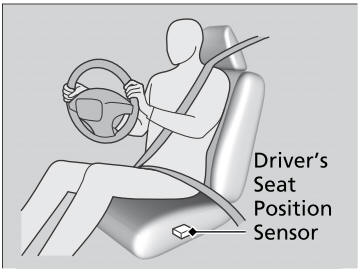
The airbags have advanced features to help reduce the likelihood of airbag related injuries to smaller occupants.
The driver's advanced airbag system includes a seat position sensor.