
Honda CR-V: Locking and Unlocking the Doors / Locking/Unlocking the Doors from the Inside
Honda CR-V 2017-2026 Owner's Manual / Controls / Locking and Unlocking the Doors / Locking/Unlocking the Doors from the Inside
 Locking a Door Without Using a Key
Locking the driver's door
Push the lock tab forward or
push the master door lock switch in the lock direction
, and close the door.
Locking the passenger's doors
Push the lock tab forward and close the door...
 Using the Lock Tab
Locking a door
Push the lock tab forward.
Unlocking a door
Pull the lock tab rearward.
When you lock the door using the lock tab on the driver's door, all of the
other doors and tailgate lock at the same time...
Other information:
Honda CR-V 2017-2026 Owner's Manual: Audio System Basic Operation
Models with Display Audio To use the audio system function, the power mode must be in ACCESSORY or ON. (Home): Select to go to the home screen. (Map) * : Select to display the map screen. (Audio): Select to display the audio screen. (Phone): Select to display the phone screen...
Honda CR-V 2017-2026 Owner's Manual: Rear Cargo Cover*
* Not available on all models The rear cargo cover can be used to conceal items in the cargo area and protect them from direct sunlight. To extend: Slightly lift up on the handle at the center edge of the cover to unhook each end, then pull the cover rearward and clip the mounting rods in the hooks at both sides of the tailgate opening...
Categories
- Manuals Home
- Honda CR-V Owners Manual
- Honda CR-V Service Manual
- Interior Fuse Box
- Front Seats
- Compass Calibration
- New on site
- Most important about car
Your Vehicle's Safety Features
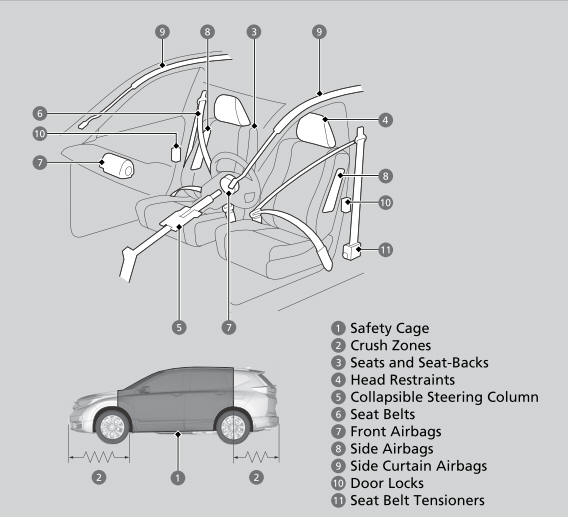
The following checklist will help you take an active role in protecting yourself and your passengers.
Your vehicle is equipped with many features that work together to help protect you and your passengers during a crash.

Copyright © 2026 www.hocrv.com