Honda CR-V: Safety of Infants and Small Children / Adding Security with a Tether
A tether anchorage point is provided behind each rear seating position.
If you have a child seat that comes with a tether but can be installed with a seat belt, the tether may be used for additional security.
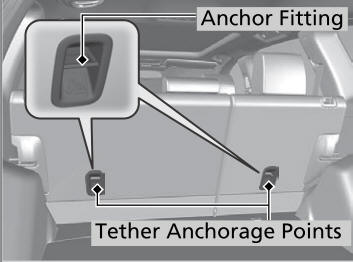
Since a tether can provide additional security to the lap/shoulder seat belt installation, we recommend using a tether whenever one is available.
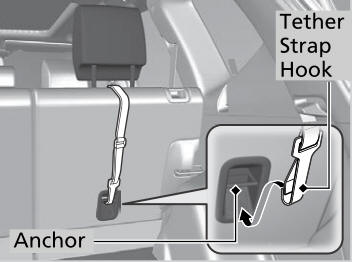
Using an outer anchor
- Put the head restraint to its upper-most position, then route the tether
strap through the head restraint legs.
Make sure the strap is not twisted.
- Secure the tether strap hook to the anchor.
- Tighten the tether strap as instructed by the child seat manufacturer.
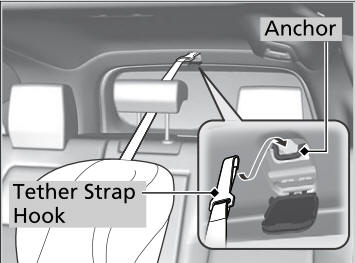
Using the center anchor
- Put the head restraint to its upper-most position.
- Open the anchor cover.
- Route the tether strap through the head restraint legs.
Make sure the strap is not twisted.
- Secure the tether strap hook to the anchor.
- Tighten the tether strap as instructed by the child seat manufacturer.
 Installing a Child Seat with a Lap/Shoulder Seat Belt
A child seat can be installed with a lap/shoulder belt in any rear seat or,
if absolutely
necessary, the front passenger seat.
Place the child seat on the vehicle seat...
 Safety of Larger Children
Protecting Larger Children
The following pages give instructions on how to check proper seat belt fit,
what kind
of booster seat to use if one is needed, and important precautions for a child
who
must sit in front...
Other information:
Honda CR-V 2017-2026 Owner's Manual: Heated Windshield Button
Canadian models Press the heated windshield button to deice the windshield at the wiper park area and along the driver side edge of the windshield when the power mode is in ON. The heated windshield will automatically switch off after 15 minutes...
Honda CR-V 2017-2026 Owner's Manual: Speed Dial
Up to 20 speed dial numbers can be stored per phone. To store a speed dial number: Go to the Phone Menu screen. Select Speed Dial. Select New Entry. From Import from Call History: Select a number from the call history. From Manual Input: Input the number manually...
Categories
- Manuals Home
- Honda CR-V Owners Manual
- Honda CR-V Service Manual
- Oil Check
- Front Seats
- Accessory Power Sockets
- New on site
- Most important about car
Driver Attention Monitor
The Driver Attention Monitor analyzes steering inputs to determine if the vehicle is being driven in a manner consistent with drowsy or inattentive driving. If it determines that the vehicle is being driven in such a manner, it will display the degree of the driver's attention in the Driver Information Interface.