
Honda CR-V: Adjusting the Mirrors / Power Door Mirrors
You can adjust the door mirrors when the
ignition switch is in ON  *1 .
*1 .
*1: Models with the smart entry system have an ENGINE START/STOP button instead of an ignition switch.
Mirror position adjustment
L/R selector switch: Select the left or right mirror. After adjusting the mirror, return the switch to the center position.
Mirror position adjustment switch: Press the switch left, right, up, or down to move the mirror.

 Automatic Dimming Rearview Mirror*
* Not available on all models
When driving after dark, the automatic
dimming rearview mirror reduces the glare
from headlights behind you. This feature is
always active...

Other information:
Honda CR-V 2017-2026 Owner's Manual: Engine Coolant
Specified coolant: Honda Long Life Antifreeze/Coolant Type 2 This coolant is premixed with 50% antifreeze and 50% water. Do not add any straight antifreeze or water. We recommend you check the engine coolant level every time you refuel. Check the reserve tank...
Honda CR-V 2017-2026 Owner's Manual: Siri® Eyes Free
You can talk to Siri using the (Talk) button on the steering wheel when your iPhone is paired to the Bluetooth® HandsFreeLink® (HFL) system. Siri is a trademark of Apple Inc. Check Apple Inc. website for features available for Siri. We recommend against using Siri other than in Siri® Eyes Free while operating a vehicle...
Categories
- Manuals Home
- Honda CR-V Owners Manual
- Honda CR-V Service Manual
- Front Sensor Camera
- TPMS Calibration
- Head Restraints
- New on site
- Most important about car
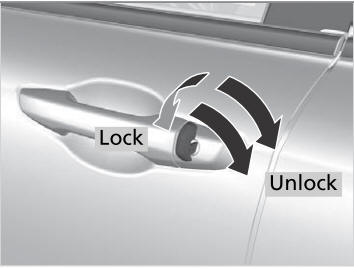
Locking/Unlocking the Doors Using a Key
If the smart entry remote battery or the vehicle battery is dead, use the key instead of the smart entry remote.
Fully insert the key and turn it.

Copyright © 2026 www.hocrv.com