
Honda CR-V: Controls / Adjusting the Mirrors
Honda CR-V 2017-2026 Owner's Manual / Controls / Adjusting the Mirrors
 Adjusting the Steering Wheel
The steering wheel height and distance from your body can be adjusted so that
you
can comfortably grip the steering wheel in an appropriate driving posture...

Other information:
Honda CR-V 2017-2026 Owner's Manual: Automatic Brake Hold
Keeps the brake applied after releasing the brake pedal until the accelerator pedal is pressed. You can use this system while the vehicle is temporarily stopped, like at traffic lights and in heavy traffic. WARNING Activating the automatic brake hold system on steep hills or slippery roads may still allow the vehicle to move if you remove your foot from the brake pedal...
Honda CR-V 2017-2026 Owner's Manual: Using the Tailgate Outer Handle
f you press the outer handle of the tailgate for no longer than one second, the tailgate opens automatically. The beeper sounds. If you want to open the tailgate manually, press the button for more than one second. If you are carrying the smart entry remote, you do not have to unlock the tailgate before opening it...
Categories
- Manuals Home
- Honda CR-V Owners Manual
- Honda CR-V Service Manual
- Quick Reference Guide
- How to Use the Auto High-Beam
- Jump Starting Procedure
- New on site
- Most important about car
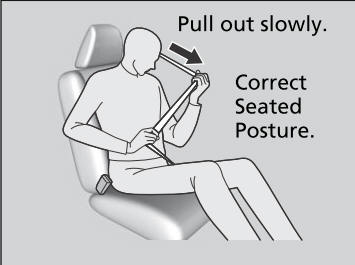
Fastening a Seat Belt
After adjusting a front seat to the proper position, and while sitting upright and well back in the seat:
Pull the seat belt out slowly.

Copyright © 2026 www.hocrv.com