
Honda CR-V: Audio System Basic Operation / Playing an iPod
Connect the iPod using your USB connector to the USB port, then select the iPod mode.

*1:Some or all of the lists may not be displayed.
Available operating functions vary on models or versions. Some functions may not be available on the vehicle’s audio system.
If there is a problem, you may see an error message on the audio/information screen.
If you operate any music app on your iPhone/iPod while the phone is connected to the audio system, you may no longer be able to operate the same app on the audio/information screen.
Reconnect the device if necessary.
If an iPhone is connected via Apple CarPlay™ , the iPod/USB source is unavailable and audio files on the phone can only be played within Apple CarPlay™
 Scan
Scan
Sample each channel on the selected mode for 10 seconds.
Select Scan.
Select Scan Channels.You can select the desired channel by
songs using Scan Song in Preset...

Other information:
Honda CR-V 2017-2026 Owner's Manual: ACC with Low Speed Follow Conditions and Limitations
The system may automatically shut off and the ACC indicator will come on under certain conditions. Some examples of these conditions are listed below. Other conditions may reduce some of the ACC functions. Environmental conditions Driving in bad weather (rain, fog, snow, etc...
Honda CR-V 2017-2026 Owner's Manual: Tire Rotation
Rotating tires according to the maintenance messages on the driver information interface helps to distribute wear more evenly and increase tire life. Tires without rotation marks Rotate the tires as shown here. Tires with rotation marks Rotate the tires as shown here...
Categories
- Manuals Home
- Honda CR-V Owners Manual
- Honda CR-V Service Manual
- Multi-View Rear Camera
- To rapidly defrost the windows
- How to Turn Off the Auto High-Beam
- New on site
- Most important about car
Your Vehicle's Safety Features
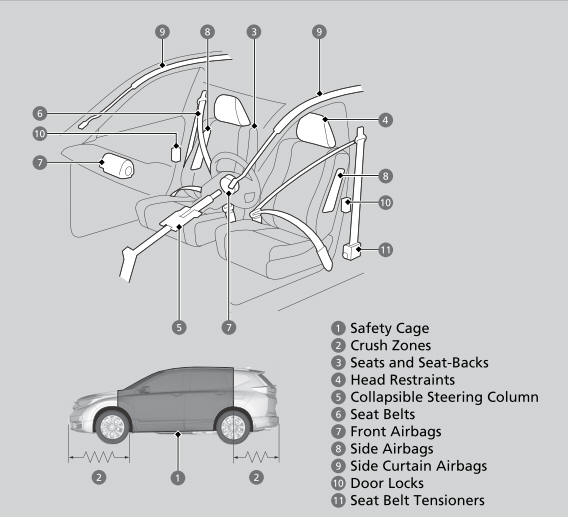
The following checklist will help you take an active role in protecting yourself and your passengers.
Your vehicle is equipped with many features that work together to help protect you and your passengers during a crash.
