Honda CR-V: Collision Mitigation Braking System™ (CMBS™ ) / Collision Alert Stages
The system has three alert stages for a possible collision. However, depending on circumstances, the CMBS™ may not go through all of the stages before initiating the last stage.

CMBS™ On and Off
Press and hold the button until the beeper sounds to switch the system on or off. When the CMBS™ is off:
- The CMBS™ indicator in the instrument panel comes on.
- A message on the driver information interface reminds you that the system is off.
The CMBS™ is turned on every time you start the engine, even if you turned it off the last time you drove the vehicle.
The CMBS™ may automatically shut off, and the CMBS™ indicator will come and stay on under certain conditions.
When the CMBS™ is activated, it will continue to operate even if the accelerator pedal is partially depressed. However, it will be canceled if the accelerator pedal is deeply depressed.
The indicators for the Adaptive Cruise Control (ACC) with Low Speed Follow, Road Departure Mitigation (RDM), Vehicle Stability Assist™ (VSA®) system, Vehicle Stability Assist™ (VSA®) OFF, low tire pressure/TPMS, Collision Mitigation Braking System™ (CMBS™ ), and Parking Brake and Brake System (Amber) may come on along with a message in the Driver Information Interface after reconnecting the battery. Drive a short distance at more than 12 mph (20 km/h). The indicator should go off. If it does not, have your vehicle checked by a dealer.
 Collision Mitigation Braking System™
(CMBS™ )
Can assist you when there is a possibility of your vehicle colliding with a
vehicle or a
pedestrian detected in front of yours. The CMBS™ is designed to alert you when a
potential collision is determined, as well as to reduce your vehicle speed to
help
minimize collision severity when a collision is deemed unavoidable...
 With Little Chance of a Collision
The CMBS™ may activate even when you are aware of a vehicle ahead of you, or
when there is no vehicle ahead. Some examples of this are:
When Passing
Your vehicle approaches another vehicle ahead of you and you change lanes to
pass...
Other information:
Honda CR-V 2017-2026 Owner's Manual: Wireless Charger*
* Not available on all models To use the wireless charger, the power mode must be in ACCESSORY or ON. Charge a compatible device on the area indicated by the mark as follows: To turn the system on and off, press and hold the (power) button. When the system is activated, the green indicator light comes on...
Honda CR-V 2017-2026 Owner's Manual: Operating Apple CarPlay™ with Siri®
Press and hold the (Talk) button to activate Siri®. Below are examples of questions and commands for Siri®. What movies are playing today? Call dad at work. What song is this? How’s the weather tomorrow? Read my latest email. Find a table for four tonight in Chicago...
Categories
- Manuals Home
- Honda CR-V Owners Manual
- Honda CR-V Service Manual
- Multi-View Rear Camera
- Accessory Power Sockets
- How to Use the Auto High-Beam
- New on site
- Most important about car
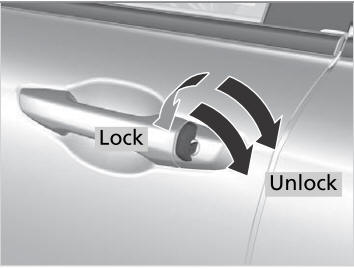
Locking/Unlocking the Doors Using a Key
If the smart entry remote battery or the vehicle battery is dead, use the key instead of the smart entry remote.
Fully insert the key and turn it.