
Honda CR-V: Features / Audio System
Honda CR-V 2017-2026 Owner's Manual / Features / Audio System
 Features
..
 About Your Audio System
The audio system features AM/FM radio and SiriusXM® Radio service * . It can
also play USB flash drives, and iPod, iPhone and Bluetooth® devices.
You can operate the audio system from the buttons and switches on the panel,
the
remote controls on the steering wheel, or the icons on the touchscreen interface
* ...
Other information:
Honda CR-V 2017-2026 Owner's Manual: Indicators
*1:Models with the smart entry system have an ENGINE START/STOP button instead of an ignition switch. *2:Canadian models only: Apply and hold the brake pedal before turning the ignition on. Driver Information Interface Warning and Information Messages The following messages appear only on the driver information interface...
Honda CR-V 2017-2026 Owner's Manual: Apple CarPlay™
If you connect an Apple CarPlay™ -compatible iPhone to the system via the 1.5A USB port, you can use the audio/information screen, instead of the iPhone display, to make a phone call, listen to music, view maps (navigation), and access messages...
Categories
- Manuals Home
- Honda CR-V Owners Manual
- Honda CR-V Service Manual
- Wallpaper Setup
- Accessory Power Sockets
- Rear Seats
- New on site
- Most important about car
Your Vehicle's Safety Features
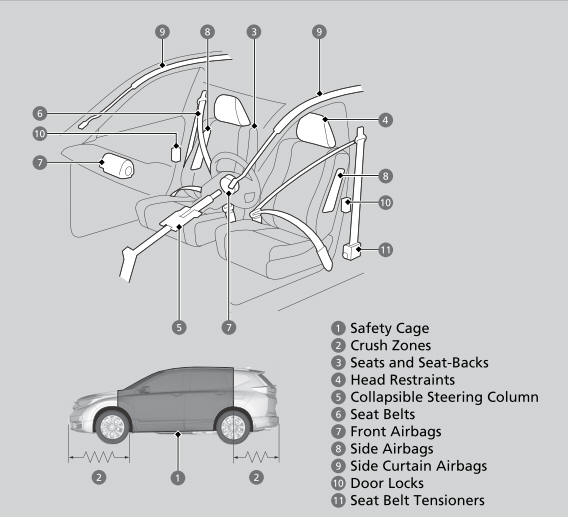
The following checklist will help you take an active role in protecting yourself and your passengers.
Your vehicle is equipped with many features that work together to help protect you and your passengers during a crash.

Copyright © 2026 www.hocrv.com