
Honda CR-V: Handling the Unexpected / Tools
Types of Tools

The tools are stored in the cargo area.

 If a Tire Goes Flat
If a tire goes flat while driving, grasp the steering wheel firmly, and brake
gradually
to reduce speed. Then stop in a safe place. Replace the flat tire with a compact
spare
tire...
Other information:
Honda CR-V 2017-2026 Owner's Manual: Display Setup
You can change the brightness or color theme of the audio/information screen. Changing the Screen Brightness Select . Select Settings. Select System. Select the Display tab. Select Display Settings. Select the setting you want. Select OK. You can change the Contrast and Black Level settings in the same manner...
Honda CR-V 2017-2026 Owner's Manual: Important Safety Precautions
Always wear your seat belt A seat belt is your best protection in all types of collisions. Airbags are designed to supplement seat belts, not replace them. So even though your vehicle is equipped with airbags, make sure you and your passengers always wear your seat belts, and wear them properly...
Categories
- Manuals Home
- Honda CR-V Owners Manual
- Honda CR-V Service Manual
- Wallpaper Setup
- Front Sensor Camera
- Compass Zone Selection
- New on site
- Most important about car
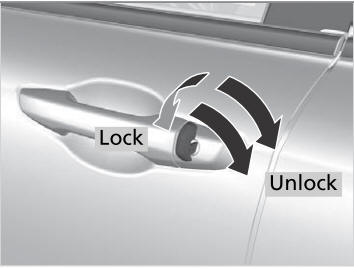
Locking/Unlocking the Doors Using a Key
If the smart entry remote battery or the vehicle battery is dead, use the key instead of the smart entry remote.
Fully insert the key and turn it.

Copyright © 2026 www.hocrv.com